Exam Topics
- F5CAB3
- F5CAB3.02
- Determine the active nodes in a priority group configuration
- F5CAB3.02
Introduction
In previous courses, we learned how to deploy a Virtual Server with a pool and distribute client traffic across its pool members. We explored different load-balancing methods, including static algorithms, weighted distribution, and dynamic decisions based on the current health of the pool members.
Until now, however, the fundamental principle has remained the same: all available and healthy pool members can participate in the load-balancing decision.
In this course, we will introduce Priority Group Activation, a feature that adds another level of control over how BIG-IP uses pool members. Priority groups allow administrators to organize pool members into different levels of priority and determine when each group should be activated.
The Backup Server
In a pool, every healthy pool member can normally participate in the load-balancing decision. However, there are situations where we may want to keep some servers in standby and use them only when the primary servers are no longer available.
For example, imagine a pool with:
- 3 production servers
- 1 backup server
During normal operation, when all three production servers are healthy, we do not want the backup server to receive any client traffic.
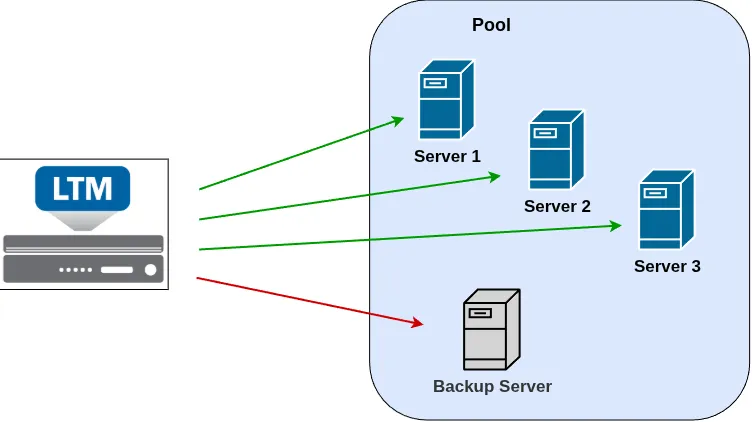
With a standard pool configuration, any pool member that is considered healthy and available by its health monitor is eligible to receive traffic. The load-balancing method then determines how traffic is distributed among those available members.
In our scenario, however, we want to introduce a primary and backup model. The production servers should handle client traffic during normal operation, while the backup server should remain out of the load-balancing decision.
The backup server should only become active when the availability of the production servers falls below the configured condition.
This is exactly the type of behavior that Priority Group Activation allows us to implement.
What Is Priority Group Activation?
Priority Group Activation allows BIG-IP to organize pool members into different priority groups and control which groups participate in the load-balancing decision based on the availability of their members.
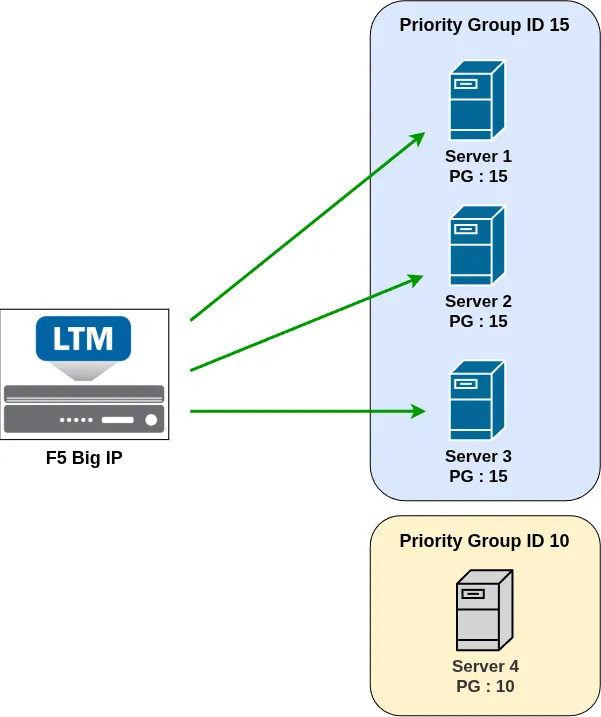
Each pool member is assigned a priority group ID. A higher priority group is preferred over a lower priority group.
For example, we could configure:
| Pool Member | Priority Group |
|---|---|
| Production Server 1 | 15 |
| Production Server 2 | 15 |
| Production Server 3 | 15 |
| Backup Server | 10 |
...