Exam Topics
- F5CAB3
- F5CAB3.02
- Apply appropriate health monitor
- F5CAB3.02
Introduction
In the ADC Concepts lesson, we explored several ways in which the F5 BIG-IP adds value to an application delivery environment. One of its core functions is load balancing, where a single Virtual Server distributes client requests across multiple backend servers (pool members) within a pool.
However, load balancing alone is not enough. What happens if one of the servers becomes unavailable? How can administrators perform maintenance on a server without disrupting user traffic? And how can the BIG-IP distinguish between a healthy application and a server that is simply powered on but unable to serve requests?
This is where Health Monitors come into play.
Health monitors continuously verify the availability and responsiveness of backend servers and applications. Based on the monitor results, the BIG-IP determines which pool members are eligible to receive traffic and automatically removes unhealthy servers from load balancing decisions.
In this course, we will examine how health monitors work, the different monitor types available, and how they help ensure application availability and seamless traffic delivery.
What Is a Health Monitor?
A Health Monitor is a profile that can be applied to a Node, a Pool Member, or an entire Pool. Its purpose is to continuously verify the availability and, in some cases, the responsiveness of backend servers and applications.
If a server becomes unavailable or fails to respond correctly to the monitor checks, the F5 BIG-IP can automatically remove the affected pool member from load-balancing decisions. Client traffic is then redirected only to healthy servers, helping to maintain application availability and avoid user-facing errors.
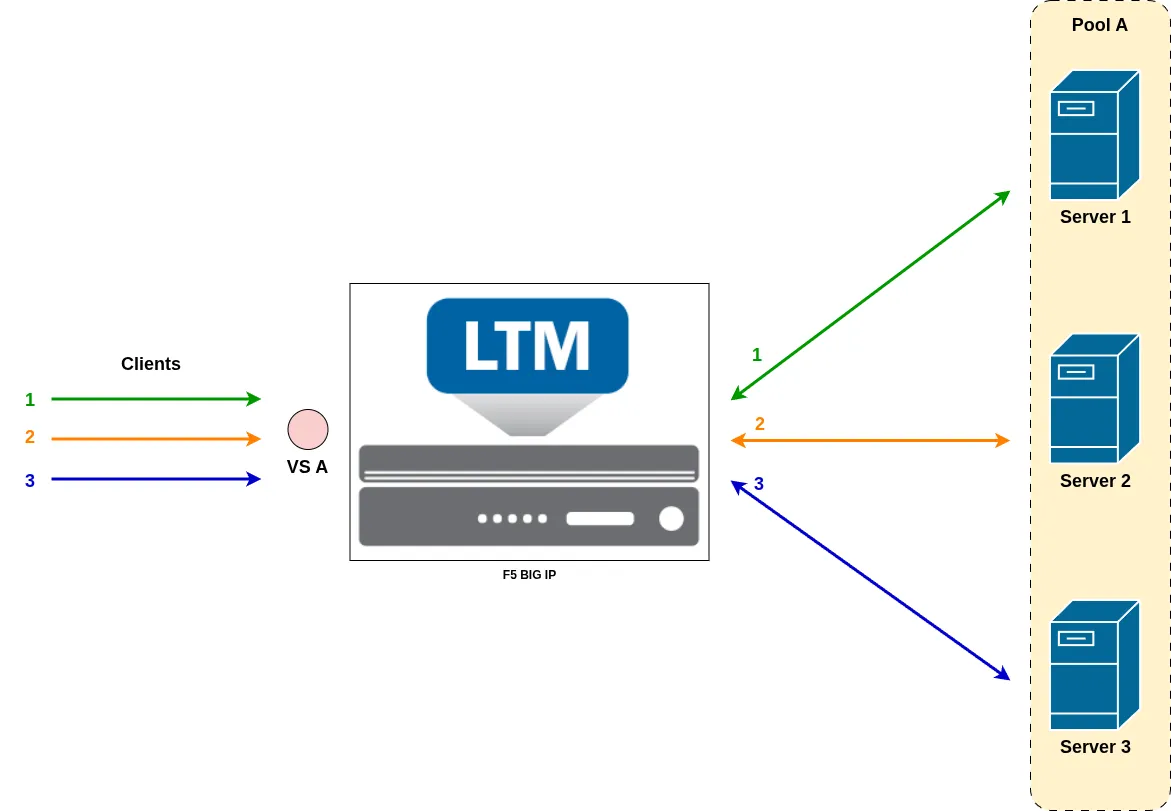
In the example above, Virtual Server A is associated with Pool A, which contains three pool members. Under normal conditions, client requests are distributed across all three servers according to the configured load-balancing method.
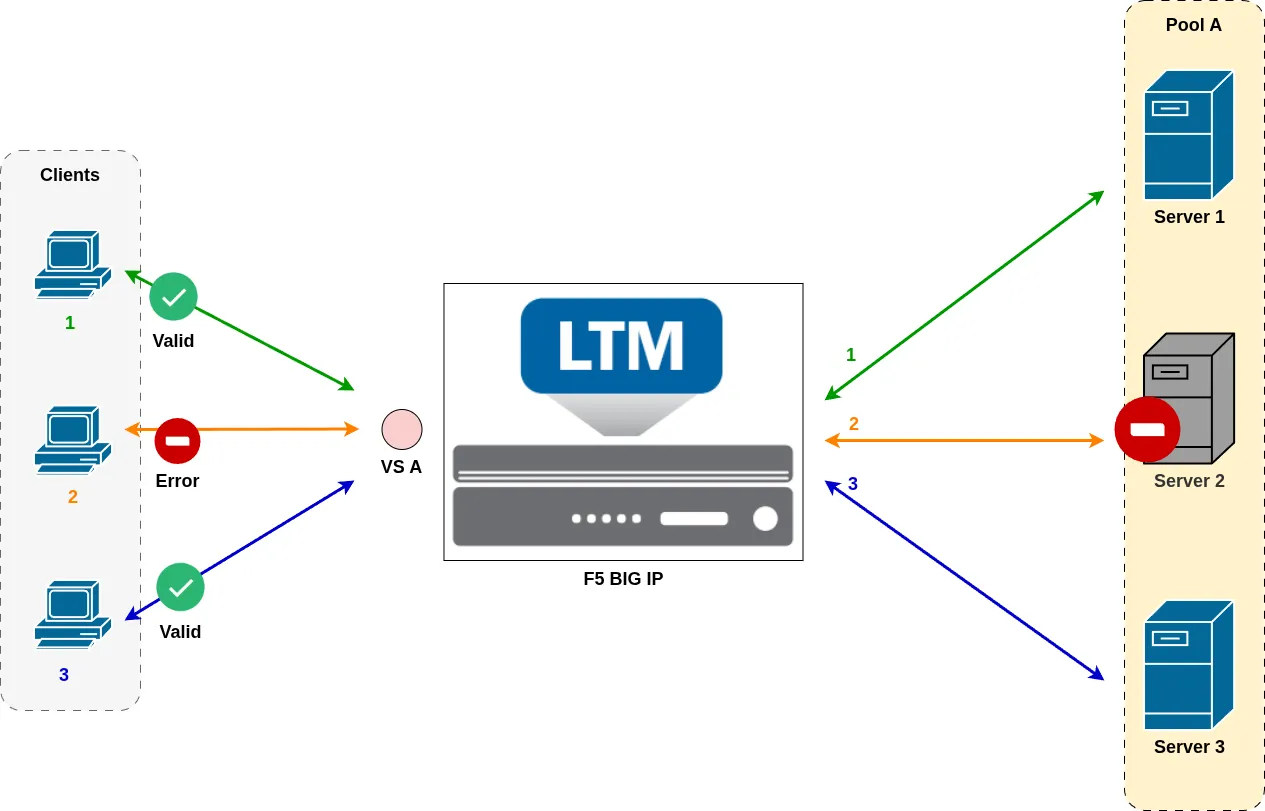
Now imagine that Server 2 suddenly becomes unavailable, for example, due to a power failure, network outage, or an administrator unplugging the server. Without health monitoring, the BIG-IP would continue sending traffic to Server 2, causing connection failures and a poor user experience.
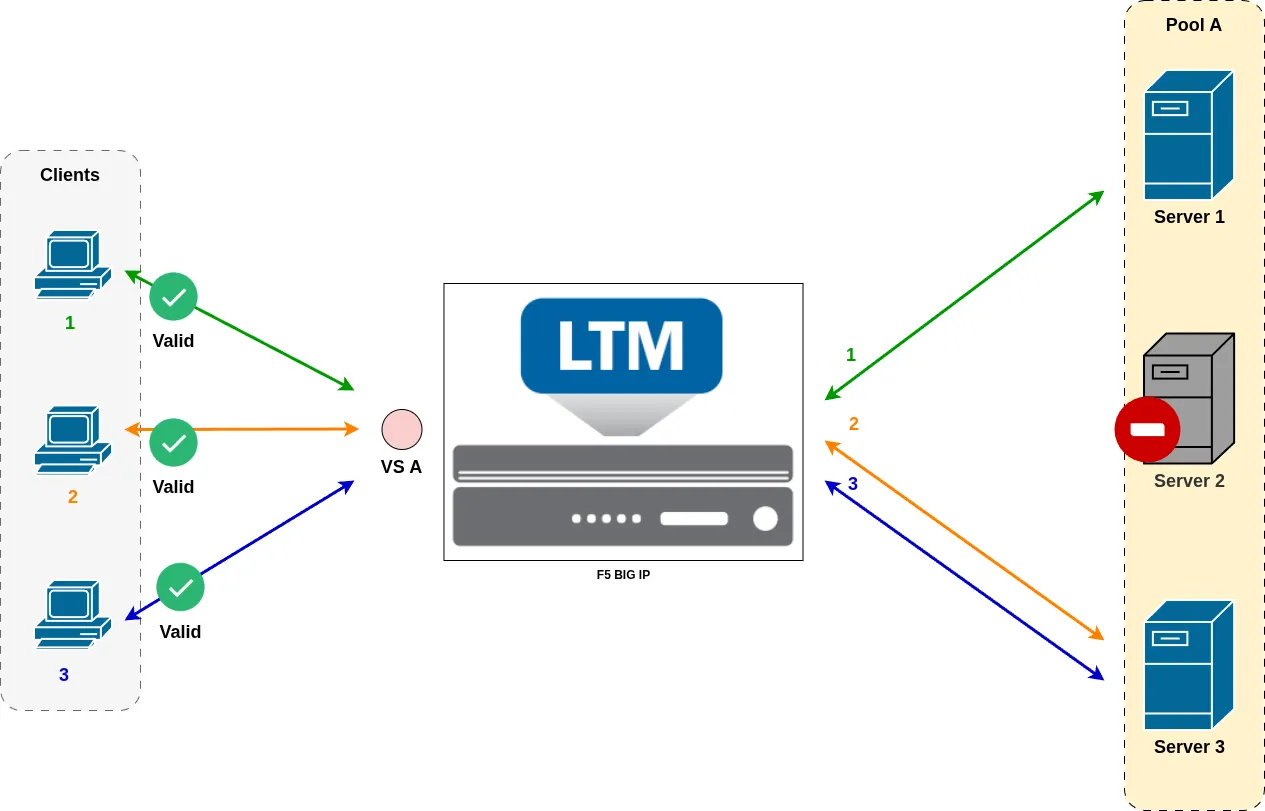
To prevent this, a Health Monitor is configured. The monitor continuously checks the status of the backend servers. When it detects that Server 2 is no longer responding correctly, the BIG-IP marks it as offline and automatically stops sending traffic to it. The remaining healthy servers continue to serve client requests, ensuring uninterrupted service.
Traffic Handling When a Pool Member Goes Down
By default, when a health monitor marks a pool member as unavailable, the BIG-IP immediately stops sending new client connections to that server. However, existing connections are not automatically and transparently redirected to another pool member.
For stateful protocols, especially TCP-based applications, the existing connection remains associated with the failed server. If the server is no longer responding, the connection will eventually timeout or be reset. Only when the client establishes a new TCP connection will the BIG-IP perform a new load-balancing decision and select a healthy pool member.
As a result, a server failure often impacts users with active sessions, even though new connections are successfully redirected to healthy servers.
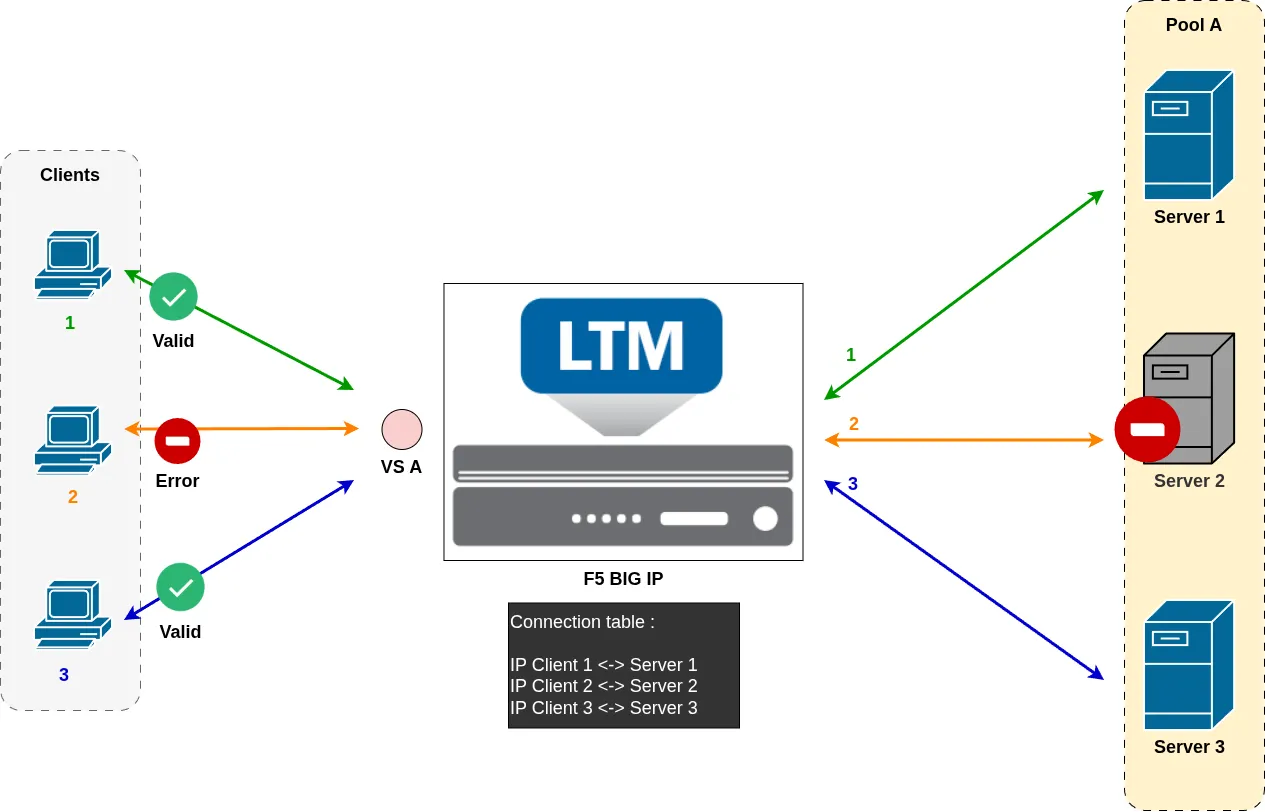
In this example, Client 2 already has an active connection to Server 2, and this connection is recorded in the BIG-IP connection table. Although Server 2 has just been marked DOWN by the health monitor, the existing connection is not automatically migrated to another pool member.
As a result, traffic belonging to Client 2’s existing session continues to be forwarded to Server 2. If the server is no longer able to process the connection, the client will typically experience a timeout or connection failure.
Only after the existing connection expires or is closed, and the client establishes a new connection to the Virtual Server, will the BIG-IP perform a new load-balancing decision. Since Server 2 is marked DOWN, it is excluded from the selection, and the new connection is directed to one of the remaining healthy pool members.
This behavior is less noticeable with stateless protocols, such as DNS. Since each request is independent and does not rely on a persistent connection, every new request can immediately be directed to a healthy pool member when a server is marked down.
In short, health monitors protect new traffic, but they do not automatically migrate existing sessions from a failed server to another backend. This distinction is important when designing highly available applications.
Monitor Types
There are multiple types of health monitors used to probe backend servers, each providing a different level of granularity depending on what needs to be validated.
Simple Monitor
A simple monitor is typically applied at the node level and is used to determine whether a server is reachable and operational.
A common example is the ICMP monitor. It sends an ICMP Echo Request to the server, and expects an ICMP Echo Reply in return. If the response is received, the node is marked UP; otherwise, it is marked DOWN.
This type of monitor only validates basic network reachability of the server (node). It does not verify whether individual services running on that server are actually available.
Service Monitor
A service monitor provides a more granular level of health checking by validating specific services running on a pool member.
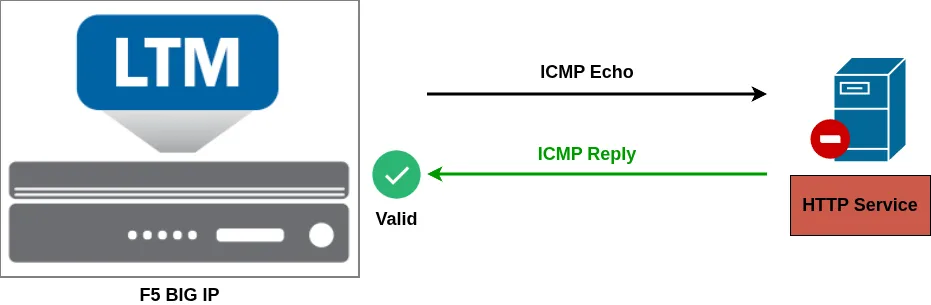
In this example, the server successfully responds to ICMP requests, indicating that it is reachable at the network level. However, the web service itself is not functioning correctly and fails to return a valid HTTP response. Since the monitor only validates ICMP reachability and still reports the server as healthy, client requests may continue to be directed to a malfunctioning pool member, resulting in application errors for users.
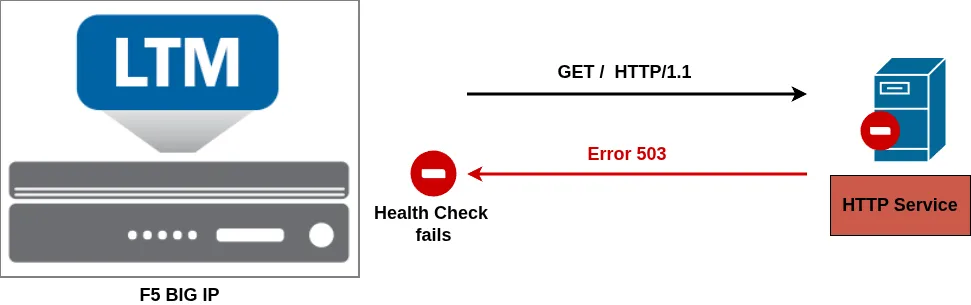
With an appropriately configured service monitor, the BIG-IP evaluates the actual application layer behavior rather than simple network reachability. As a result, even though the node appears reachable, the pool member is correctly identified as unhealthy due to the failed service response.
The server is therefore marked as down and automatically removed from the load balancing pool, ensuring that client traffic is only directed to functional application instances.
This makes service monitors much more accurate for application delivery use cases.
Common Service Monitors
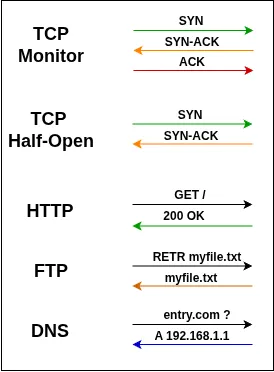
- TCP Monitor
Attempts to establish a full TCP connection on a specific port. If the three-way handshake succeeds, the pool member is marked UP. - TCP Half-Open Monitor
Initiates a TCP handshake and stops after receiving the SYN-ACK from the server by sending a reset (RST). This verifies that the service responds without fully establishing the connection, helping avoid unnecessary session load on backend servers. - HTTP Monitor
Sends an HTTP request to a specific URI. The server must return a valid HTTP response for the pool member to be marked UP. - FTP Monitor
Connects to an FTP service and performs an operation such as file retrieval. The monitor succeeds only if the expected file transfer completes successfully. - DNS Monitor
Sends a DNS query to a DNS server and validates the response, including record existence and correctness, to determine whether the service is healthy.
Timers
Health monitors rely on timers to determine the availability and stability of a resource.
Interval
The interval defines how frequently the F5 BIG-IP sends a health check to a server.
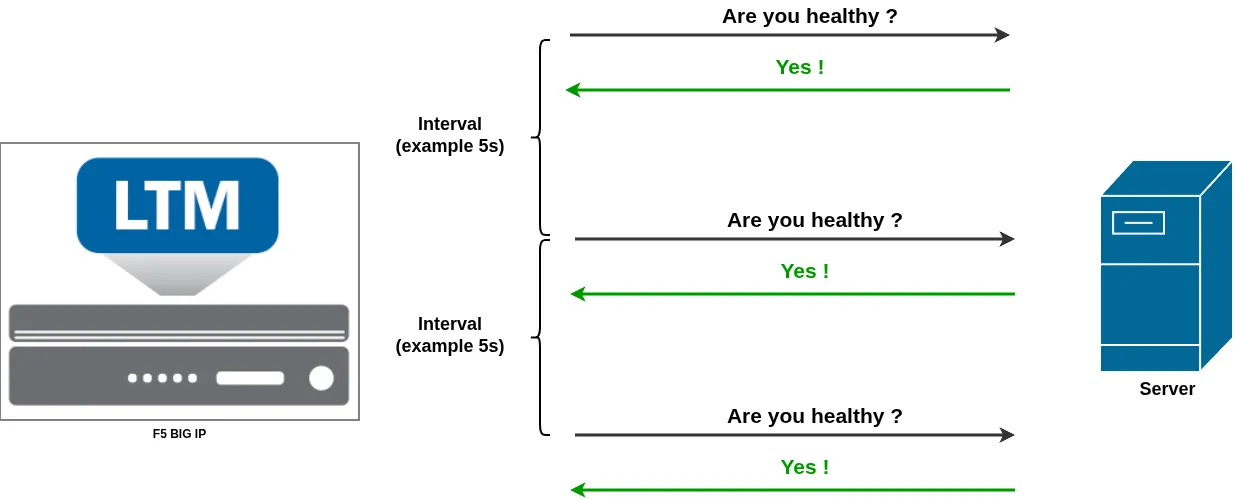
For example, with a TCP monitor configured with an interval of 5 seconds, the BIG-IP will send a TCP SYN probe every 5 seconds to verify that the service is reachable.
Timeout
The timeout works together with the interval and defines how long the BIG-IP waits for a valid response to a monitor request.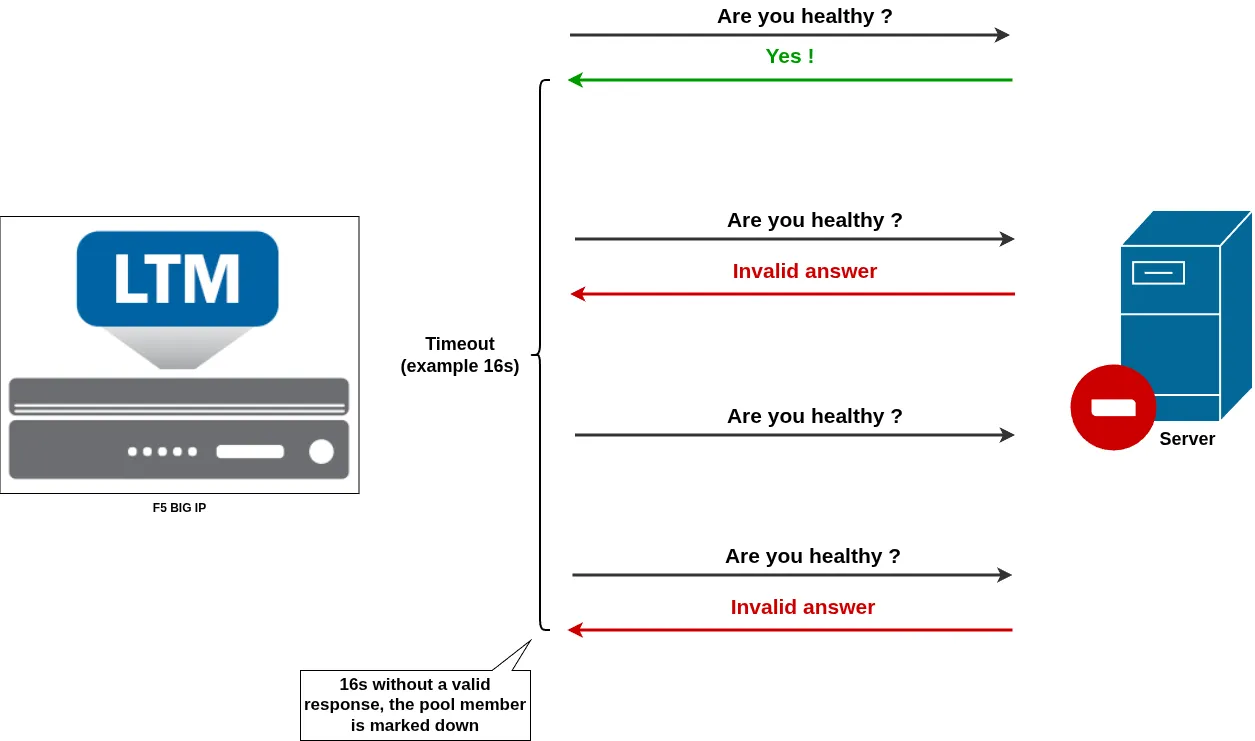
- If a valid response is received within the timeout period, the resource is considered healthy
- If no response is received within the timeout window, the resource is marked as down (offline)
A common best practice is to set the timeout to 3 × interval + 1. This allows the system to tolerate a small number of transient failures before declaring a server unavailable.
- A short timeout improves failure detection speed but may lead to instability (a single missed probe could trigger a failover)
- A long timeout improves stability but delays failure detection, which can impact user experience
Monitor example
In this example, the monitor is configured with an interval of 5 seconds and a timeout of 16 seconds. The second health check fails, but the pool member is not immediately marked down.
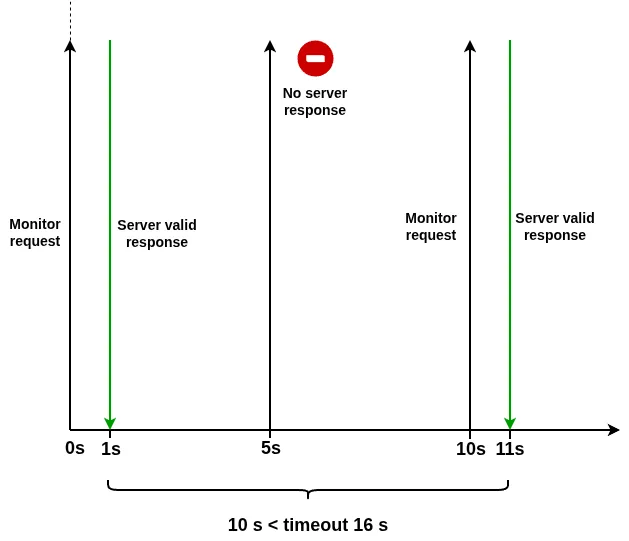
A single missed health check does not necessarily indicate a server failure. The server may be experiencing a temporary delay, a brief network issue, or simply taking longer than usual to respond. As long as the BIG-IP receives at least one valid monitor response within the 16-second timeout window, the pool member remains UP and continues to receive new client connections.
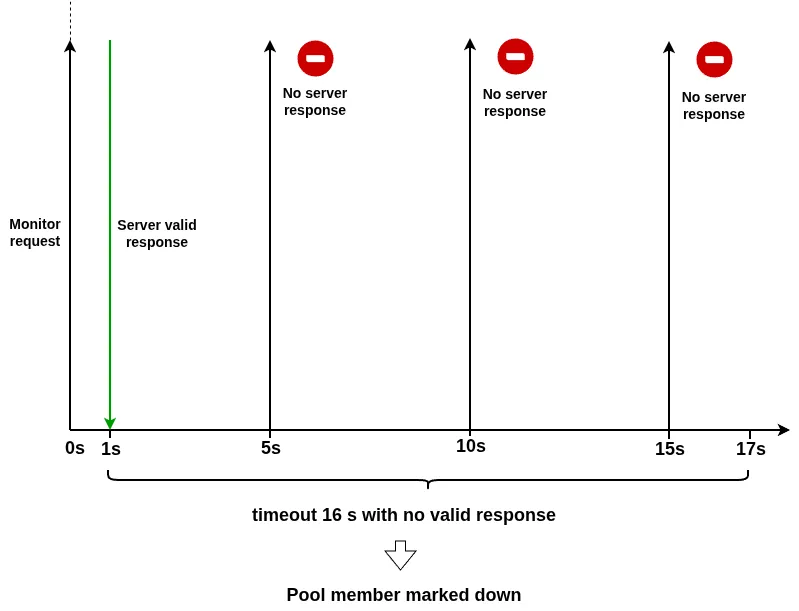
However, if multiple consecutive monitor probes fail and no valid response is received during the entire 16-second timeout period, the BIG-IP considers the resource unavailable. In this example, after three consecutive failed checks, the timeout window expires without a successful response.
At that point, the pool member is marked DOWN (offline) and is removed from load-balancing decisions. No new client connections are sent to the affected server, while traffic continues to be directed to the remaining healthy pool members.
Time Until Up (Flapping Servers)
Consider a scenario where a server is flapping: it becomes available briefly, then crashes repeatedly.
For example, the server may be up for 40 seconds, then crash again indefinitely. Although it occasionally responds, it is not truly stable.
Without additional controls, the BIG-IP could repeatedly mark the server as up and down, causing unstable traffic behavior.
To mitigate this, you can use the Time Until Up setting.
Instead of marking a server as available after the first successful response, the BIG-IP requires the server to remain healthy for a defined period before allowing it to receive traffic.
For example, if Time Until Up is set to 60 seconds, a flapping server that only stays stable for short periods will never reach the UP state, and therefore will not receive client traffic.
Performance Monitor
Performance monitors are standard health monitors enhanced with the adaptive monitoring feature. When enabled, the monitor not only verifies service availability but also evaluates response time, allowing the BIG-IP to detect performance degradation, not just complete failures.
This helps ensure that a pool member is not only reachable, but also capable of responding within acceptable performance thresholds.
There are three key parameters:
- Adaptive Limit
The adaptive limit defines the maximum acceptable response time for a monitor. If a response exceeds this threshold, the system considers the application too slow and marks the resource as unhealthy, even if it is technically responding. - Allowed Divergence
This setting defines how much variation in response time is acceptable compared to the observed baseline. It helps distinguish between normal fluctuations and actual performance degradation. - Sampling Timespan
The sampling timespan determines the period over which BIG-IP collects response time data to calculate an average baseline performance.
Together, Allowed Divergence and Sampling Timespan allow the BIG-IP to build a dynamic performance baseline. If response times deviate too significantly from this baseline, the system can identify the server as performing poorly and remove it from load balancing decisions.
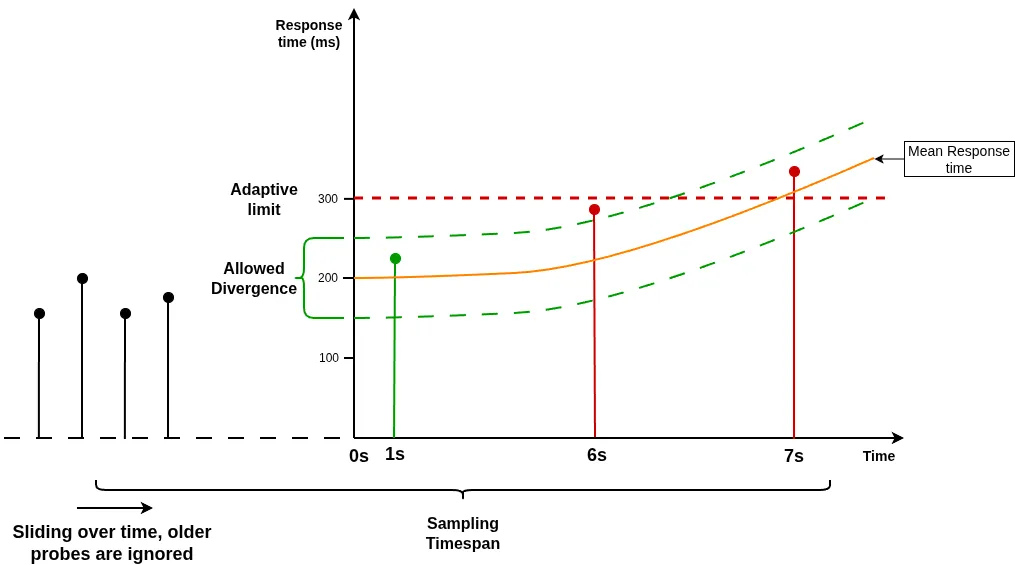
In this example, adaptive monitoring is enabled on the health monitor.
The sampling timespan defines the period over which the BIG-IP collects monitor response times and calculates the average response time. This average is dynamic and continuously evolves as new monitor probes are performed while older samples fall outside the sampling window.
In this scenario, the calculated average initially starts at 200 ms, but it gradually increases over time as newer probe responses become slower. As a result, the allowed divergence range, configured at 25%, also shifts dynamically alongside the changing average.
The first health check returns a response time of 225 ms, which remains within the allowed divergence range. This check is therefore considered valid.
The second health check falls outside the allowed divergence threshold. Because it deviates too far from the expected performance baseline, it is marked as a failed health check.
The third health check, although still within the allowed divergence range based on the updated average, exceeds the Adaptive Limit, which acts as a strict upper bound. Any response time beyond this limit is automatically considered invalid, regardless of the calculated baseline or divergence window.
This behavior ensures that adaptive monitoring can track gradual performance changes over time while still enforcing a hard ceiling to detect extreme latency conditions.
Adaptive monitoring does not replace the standard monitor timers. The timeout setting still applies. A pool member is not marked down because of a single failed health check. As long as at least one valid monitor response is received within the configured timeout window, the monitor remains successful and the pool member stays ONLINE. Only when no valid responses are received during the entire timeout period will the BIG-IP mark the resource as DOWN.
Conclusion
Health Monitors are a fundamental concept to master when working with F5 BIG-IP. An incorrect or missing monitor configuration can result in client traffic being sent to unhealthy or non-functioning resources, leading to application errors and service disruption.
An active health monitor continuously probes backend resources by sending synthetic requests and evaluating responses. If a server fails to respond correctly or meets a defined number of failed checks, it is marked as unavailable and removed from load balancing decisions, ensuring that traffic is only sent to healthy servers.
In addition to active monitoring, BIG-IP also supports passive monitoring, which observes real client traffic to determine the health of a resource without generating additional probes. This approach reduces overhead on backend servers while still providing visibility into their behavior.
Proper configuration of monitoring parameters is essential. The choice of intervals and timeouts directly impacts both reliability and detection speed. Longer values improve stability and reduce false positives, but delay failure detection. Shorter values allow faster detection of issues but can increase sensitivity and potentially lead to instability in case of transient network fluctuations.