Exam Topics
- F5CAB3
- F5CAB3.01
- Apply appropriate protocol specific profile
- F5CAB3.01
Introduction
Throughout the previous courses, we have seen how to create and configure different BIG-IP objects and profiles. In this course, we will focus on profile hierarchy and inheritance, and learn how profiles can be combined and reused to customize the behavior of a Virtual Server.
What Are Profiles and Why Are They Used?
Previously, we created a basic Virtual Server. At its core, a Virtual Server acts as a listener: it receives client connections and, when appropriate, forwards them to pool members through the load-balancing process.
However, a Virtual Server by itself has limited knowledge of the traffic it is processing. Profiles extend its capabilities by defining how the BIG-IP should handle specific aspects of the connection or application traffic.
For example, a Virtual Server must understand the transport protocol being used. A TCP profile can define how TCP connections are handled, while a UDP profile provides the corresponding behavior for UDP traffic.
A protocol profile only provides basic knowledge of the traffic. For application protocols such as HTTP, additional capabilities may be required. An HTTP profile, for example, allows the BIG-IP to understand HTTP traffic and provides capabilities to inspect, modify, or manipulate HTTP requests and responses.
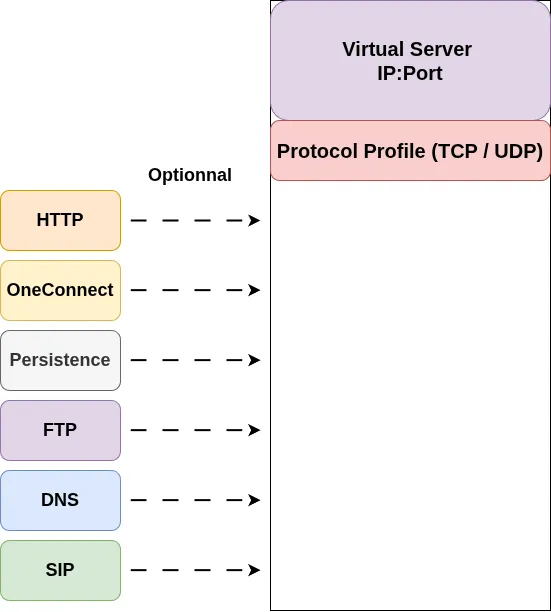
The easiest way to think about a Virtual Server is as a base listener to which profiles are attached. Each profile adds a specific set of capabilities, allowing the BIG-IP to process traffic according to the requirements of the application.
In the following sections, we will explore how these profiles are organized, how they inherit settings from parent profiles, and how this inheritance can be used to efficiently build and customize Virtual Server configurations.
Profile Dependencies
One important concept to understand when working with BIG-IP profiles is that some profiles depend on others. A higher-level profile may require a lower-level profile to provide the underlying protocol functionality.
This dependency generally follows the OSI model: profiles operating at a higher layer depend on the protocols and functionality provided by lower layers.
For example:
- FTP is an application-layer (Layer 7) protocol that runs over TCP. Therefore, an FTP profile requires a TCP profile.
- HTTP is also a Layer 7 protocol that runs over TCP, so an HTTP profile requires a TCP profile.
- Cookie persistence relies on HTTP cookies. Therefore, a cookie persistence profile requires an HTTP profile to be present.
- More generally, a feature that relies on information from a higher-level protocol requires the corresponding protocol profile to be available.
This creates a logical hierarchy between profiles. Understanding these dependencies is important when building a Virtual Server configuration, as a profile cannot always be used independently.
Custom and Parent Profiles
So far, we have seen that BIG-IP provides predefined profiles with default settings. However, these defaults may not always match the requirements of an application.
BIG-IP therefore allows administrators to create custom profiles based on existing profiles.
When creating a custom profile, you normally select a parent profile. The new profile inherits the settings from this parent, providing a starting point that can then be customized.
For example, you can create a custom TCP profile based on an existing TCP profile. The custom profile initially inherits the parent’s settings, but individual parameters can be modified when required.
Profile Inheritance
A custom profile inherits the settings of its parent profile unless those settings are explicitly overridden.
Next to profile settings, BIG-IP provides a checkbox indicating whether the value is locally configured. When the checkbox is selected, the value configured on the custom profile overrides the corresponding value inherited from the parent.
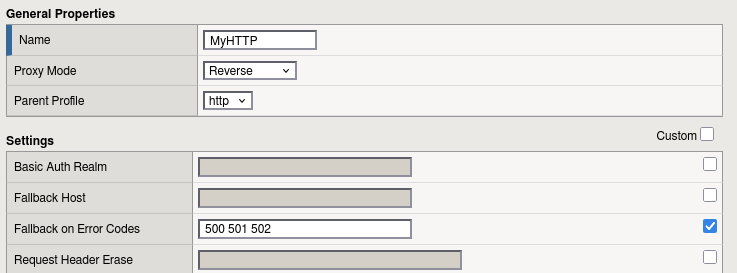
In this example, the Custom checkbox for the Fallback on Error Codes setting is enabled. This indicates that the value is explicitly overridden on the custom HTTP profile rather than inherited from its parent profile.
This inheritance is dynamic. If a setting is not overridden on the custom profile, any change made to that setting on the parent profile is automatically inherited by the child profile. This allows administrators to make a change at the parent level and have it propagated to all dependent profiles that still inherit that setting.
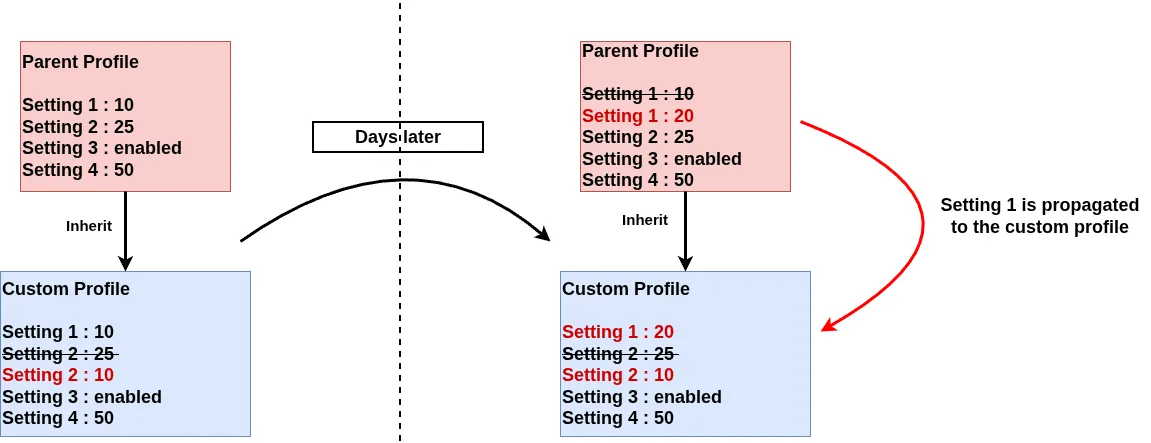
For example, if a parent TCP profile has an idle timeout of 300 seconds and a custom profile inherits this value, changing the parent to 600 seconds will automatically change the effective timeout of the custom profile to 600 seconds, provided the custom profile has not overridden the setting.
This makes profile inheritance particularly useful for centralized configuration and standardization: common settings can be managed at the parent level, while specific profiles can override only the parameters that require different behavior.
Valid Profile Combinations
Not all profiles can be combined arbitrarily. Profile dependencies and protocol requirements must be respected when configuring a Virtual Server.
For example, FTP requires TCP, so an FTP profile cannot logically be combined with a UDP profile. Similarly, HTTP runs over TCP, meaning an HTTP profile must be associated with a TCP-based configuration.
BIG-IP helps prevent some invalid combinations by limiting which profiles can be selected together. However, administrators should still understand the underlying protocol dependencies rather than simply selecting profiles based on availability.

A useful rule is to think from the lower layers upward: first establish the underlying transport protocol, then add the higher-level protocol and application profiles that depend on it.
For example:
TCP → HTTP → Cookie-based persistence
is a coherent profile hierarchy, while:
UDP → HTTP
is not, because HTTP relies on TCP.
Apply Profiles to a Virtual Server
Using the Configuration Utility (GUI)
Applying and verifying profiles on a Virtual Server is straightforward using the Configuration Utility.
Navigate to:
Local Traffic → Virtual Servers
Select the Virtual Server you want to configure.
In the Virtual Server configuration page, the available profiles are organized by profile type. Locate the appropriate section and select the profile you want to apply.
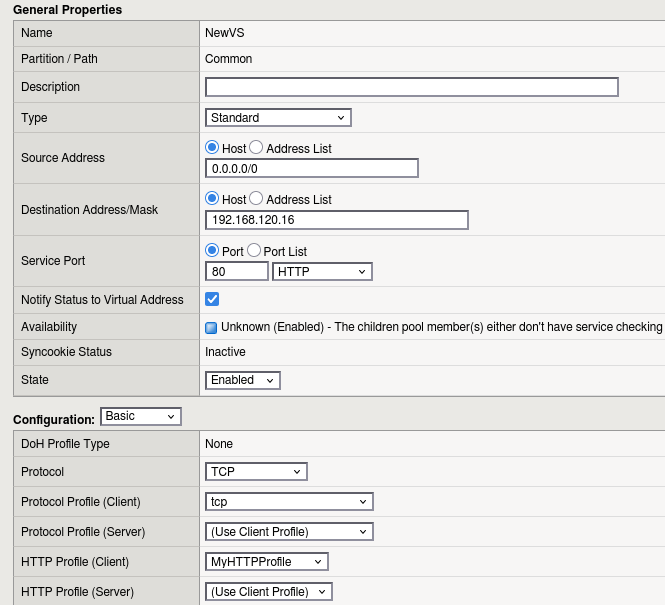
The Protocol Profiles section appears first and is where you configure the underlying transport protocol, such as TCP or UDP. The HTTP Profile section follows.
Additional profile sections are then displayed for features such as SSL, SMTP, LDAP, FTP and others.
Profile dependencies still apply, as discussed earlier. BIG-IP validates these dependencies when profiles are configured on a Virtual Server.

For example, if you attempt to apply a Rewrite profile without first assigning an HTTP profile, BIG-IP will reject the configuration and display an error. The Rewrite profile depends on HTTP functionality, so the required HTTP profile must be configured first.
This built-in validation helps prevent incompatible profile combinations from being configured on the Virtual Server.
Using TMSH (CLI)
Add profiles
Profiles can also be added to or removed from a Virtual Server using TMSH with the following command:
modify ltm virtual <VirtualServerName> profiles add|delete { <ProfileName> }
For example, to add a custom HTTP profile named MyHTTPProfile:
modify ltm virtual NewVS profiles add { MyHTTPProfile }
Profile dependencies still apply when using TMSH. BIG-IP validates the profile combination and will reject configurations that are incompatible with the Virtual Server’s protocol.
For example, attempting to add an HTTP profile to a Virtual Server configured to use UDP results in an error:
modify ltm virtual BadVS profiles add { MyHTTPProfile }

01070096:3: Virtual server /Common/BadVS lists profiles incompatible with its protocol.
This error indicates that the HTTP profile is incompatible with the Virtual Server’s configured protocol.
Verify the Applied Profiles
You can verify the Virtual Server configuration using the list command:
list ltm virtual <VirtualServerName>
Most of the profiles are displayed in the profiles section. For example:
list ltm virtual NewVS

ltm virtual NewVS {
    creation-time 2026-08-24:12:48:44
    destination 192.168.120.16:http
    ip-protocol tcp
    last-modified-time 2026-08-24:12:48:56
    mask 255.255.255.255
    profiles {
        MyHTTPProfile { }
        tcp { }
    }
    serverssl-use-sni disabled
    source 0.0.0.0/0
    translate-address enabled
    translate-port enabled
    vs-index 10
}
In this example, the Virtual Server has two profiles applied: the tcp protocol profile and the custom MyHTTPProfile. This confirms that the Virtual Server is configured to process TCP traffic with the additional HTTP functionality provided by the custom profile.
Conclusion
In this course, we have seen how profiles work on the F5 BIG-IP and how they extend the capabilities of a Virtual Server.
A Virtual Server must have an appropriate protocol profile, typically TCP or UDP, depending on the application. Additional profiles can then be associated with the Virtual Server to provide higher-level functionality. However, profile dependencies must be respected and should follow the underlying protocol hierarchy. For example:
- FTP requires TCP.
- HTTP requires TCP.
- DNS can operate over either TCP or UDP.
- Cookie persistence requires HTTP functionality.
We also explored how to create custom profiles when the default BIG-IP settings do not meet the application requirements. A custom profile inherits its settings from a selected parent profile, and individual parameters can be overridden using the corresponding custom setting.
Profile inheritance also provides centralized management: when a parent profile is modified, any setting that has not been explicitly overridden by a child profile is automatically updated through inheritance.
We saw that not all profile combinations are valid. The selected profiles must be consistent with the protocol stack and the processing mode of the Virtual Server.
Finaly, we have seen how to apply and verify profile assignments on a Virtual Server using both the Configuration Utility (GUI) and TMSH (CLI).