Exam Topics
- F5CAB3
- F5CAB3.01
- Report use of iRules
- F5CAB3.01
Introduction
F5 BIG-IP provides a wide range of capabilities for Application Delivery Control (ADC), from basic load balancing to persistence, protocol handling, traffic manipulation, and advanced application services.
However, there are situations where the built-in features do not provide exactly the behavior you need. You may want to make a decision based on specific information contained in a request, implement a custom persistence mechanism, or dynamically select a pool based on application data.
This is where iRules come into play.
In this course, we will discover what iRules are, how they work, how to apply them to a Virtual Server, and how to verify and troubleshoot their execution.
What Is an iRule?
An iRule is a TCL-based script that allows you to implement custom logic for traffic processed by BIG-IP.
BIG-IP already provides many features through its standard configuration options and profiles. For example, persistence can be configured using profiles such as Source Address Affinity or Cookie Persistence.
But what happens when you need a persistence mechanism that is not provided by the standard profiles?
For example, you might want to identify a client using a specific value contained inside an application request and use that value to implement custom persistence.
This is where iRules become useful.

An iRule can inspect traffic processed by a Virtual Server and execute custom actions based on predefined events and conditions. Because iRules use TCL, they provide programming capabilities that go beyond the standard BIG-IP configuration. TCL allows you to implement programming logic such as variables, conditions (if/else), loops, comparisons, and custom decision-making, making it possible to build complex traffic-processing logic that cannot be achieved through standard BIG-IP features alone.
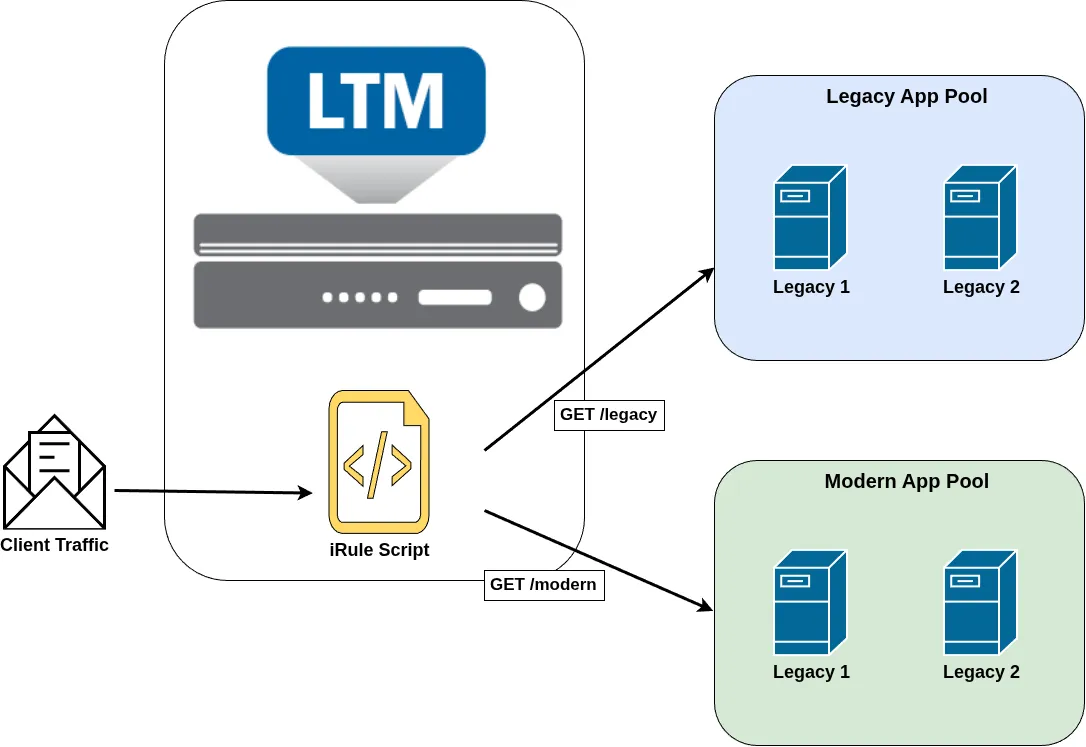
This iRule allow the selection of a different pool based on the URI.
For example, an iRule can be used to:
- Inspect or modify request and response data.
- Select a different pool based on request information.
- Perform custom persistence.
- Modify HTTP headers.
- Redirect requests.
- Select different SNAT behavior.
- Log information about connections or requests.
- Implement custom traffic-processing logic.
iRules therefore provide a way to extend BIG-IP beyond its built-in capabilities.
iRule Events
An iRule is attached to a Virtual Server, but the script does not simply execute continuously for every packet passing through it.
Instead, iRules are event-driven.
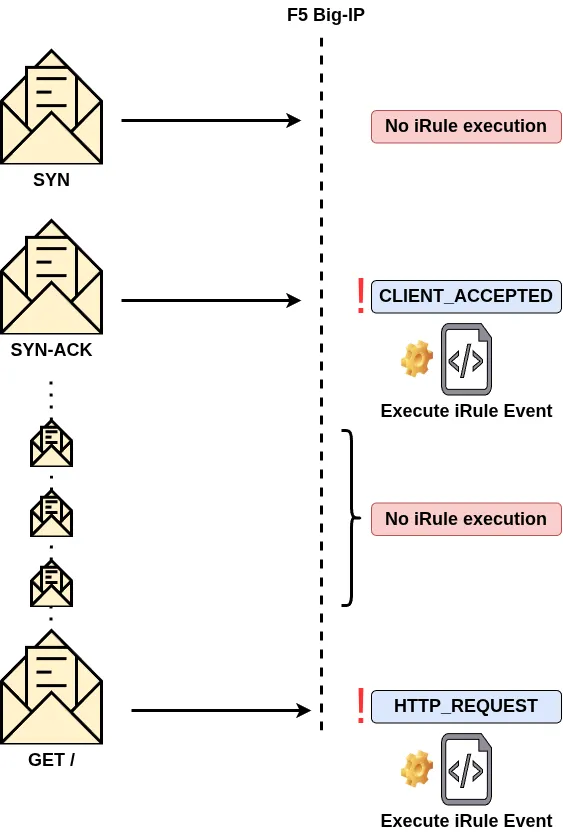
A piece of TCL code is executed when a specific event occurs during the lifetime of a connection or request.
For example, on an HTTP Virtual Server, the HTTP_REQUEST event is triggered when BIG-IP has parsed the HTTP request headers. This allows an iRule to inspect or modify the request at the HTTP layer.
Similarly, the HTTP_RESPONSE event is triggered when BIG-IP receives and parses the HTTP response headers from the server.
For example, backend servers may expose information about the software they are running through the Server HTTP header. An iRule can remove this header from the response before it is sent to the client:
when HTTP_RESPONSE {
    # Remove the Server header from the response
    HTTP::header remove Server
}
In this example, the code executes only when the HTTP_RESPONSE event occurs.
Common iRule Events
| Event | Description | Common use cases |
|---|---|---|
CLIENT_ACCEPTED |
Triggered when a client-side connection is established. | Logging, connection statistics, initialization |
CLIENT_DATA |
Triggered when client data is received while the connection is in collect mode. | Collecting and processing application data |
CLIENT_CLOSED |
Triggered when the client-side connection closes. | Logging, statistics, cleanup |
SERVER_CONNECTED |
Triggered when BIG-IP establishes a connection to the selected server. | Logging, connection handling |
SERVER_DATA |
Triggered when server data is received while the connection is in collect mode. | Collecting and processing server data |
SERVER_CLOSED |
Triggered when the server-side connection closes. | Logging, statistics, cleanup |
HTTP_REQUEST |
Triggered when BIG-IP has parsed the client HTTP request headers. | Modify headers, redirects, pool selection |
HTTP_RESPONSE |
Triggered when BIG-IP has parsed the server HTTP response headers. | Modify response headers, redirects, logging |
The available events depend on the protocol and the processing context.
As discussed in the Profile Inheritance course, profiles are still required to provide the protocol context needed by BIG-IP. For example, HTTP events require the Virtual Server to have an appropriate HTTP profile. Without HTTP processing, events such as HTTP_REQUEST and HTTP_RESPONSE will not be triggered.
Create and Apply an iRule
To create an iRule, navigate to:
Local Traffic → iRules → iRule List
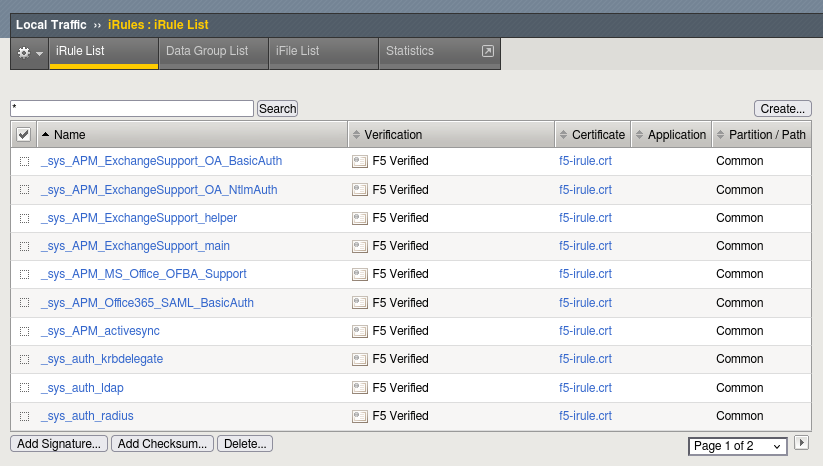
Click Create.
You can then provide a name for the iRule and enter the TCL script in the Definition field.
After clicking Finished, BIG-IP performs syntax validation before creating the iRule.
Once the iRule has been created, it must be assigned to a Virtual Server before it becomes active.
To apply an iRule:
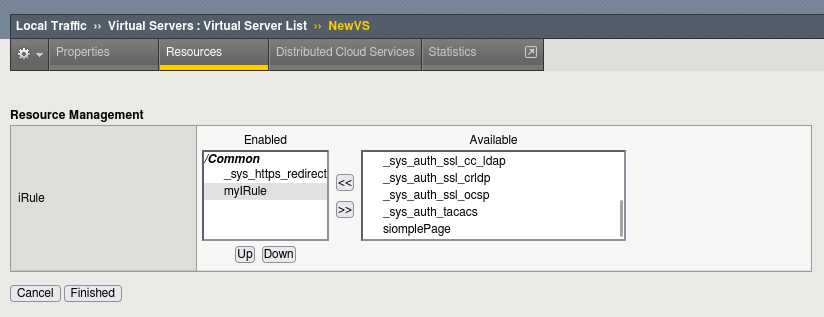
- Navigate to Local Traffic → Virtual Servers.
- Select the desired Virtual Server.
- Open the Resources tab.
- In the iRules section, click Manage.
- Move the desired iRule from Available to Enabled.
iRule Order
The order of iRules is important when multiple iRules are attached to the same Virtual Server.
If multiple iRules contain the same event, BIG-IP processes them according to their order in the list.
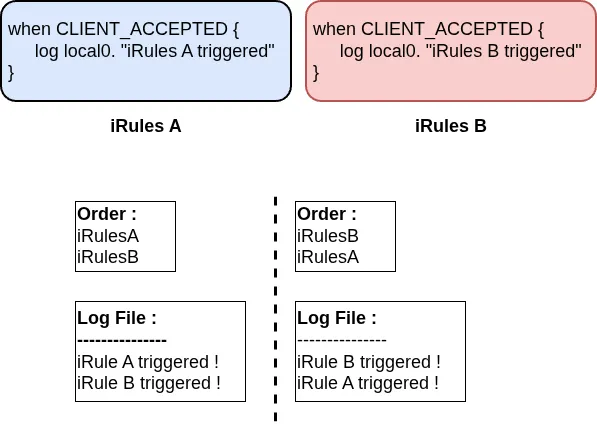
For example, if two iRules contain an CLIENT_ACCEPTED event, the iRule appearing first in the list is executed first.
This is particularly important when one iRule modifies traffic that another iRule subsequently processes.
Verify iRule Application and Usage
Once an iRule has been configured, you may want to verify that it is correctly attached to the Virtual Server and that it is actually being executed.
Verify That the iRule Is Applied
You can verify an iRule through the Configuration Utility by reviewing the Resources tab of the Virtual Server.
The attached iRule should appear in the iRules section.
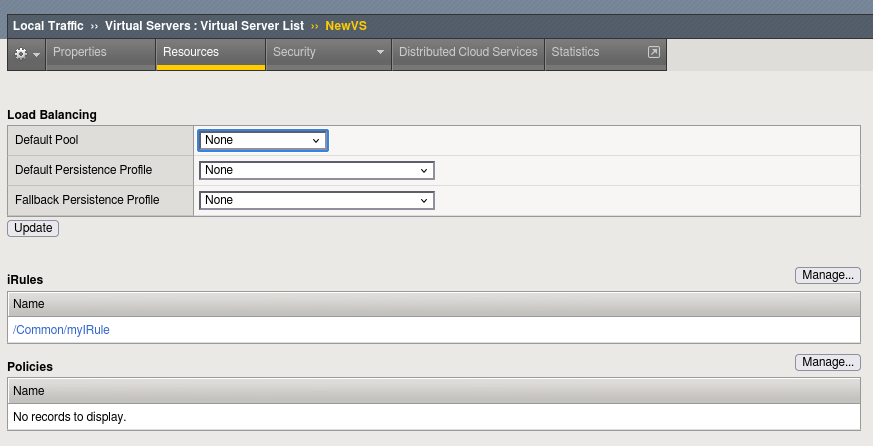
You can also verify the configuration using tmsh:
list ltm virtual NewVS
The iRule appears in the rules section:
ltm virtual NewVS {
    destination 192.168.120.16:http
    ip-protocol tcp
    profiles {
        ...
    }
    rules {
        myIRule
    }
    ...
}
Another option is the Network Map, available under:
Local Traffic → Network Map
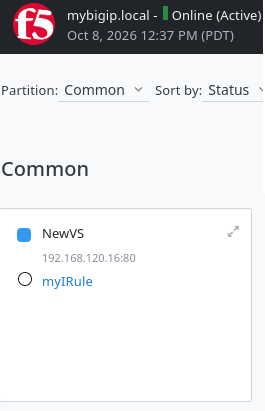
The Network Map displays the iRules associated with a Virtual Server alongside other related objects such as the pool and pool members.
iRule Statistics
BIG-IP also provides statistics that can help determine whether an iRule and its events are being executed.
Navigate to:
Statistics → Module Statistics → Local Traffic
Then select iRules as the statistics type.
The statistics provide information about iRule execution, including activity by iRule and event type.
This can help confirm that an iRule is being triggered and identify potential execution failures or aborts.
Logging Inside an iRule
For more detailed troubleshooting, you can add logging directly inside an iRule using the log command.
For example:
when CLIENT_ACCEPTED {
    log local0. "Client connection accepted"
}
The log facility determines where the message is written. For example, local0 messages are written to:
/var/log/ltm
You can therefore add logging at specific points in an iRule to understand when events are triggered and what decisions the script is making.
For example:
when HTTP_REQUEST {
    log local0. "HTTP request received: [HTTP::uri]"
}
This can be particularly useful when troubleshooting conditions, traffic selection, or unexpected iRule behavior.
Conclusion
iRules provide a powerful way to add custom traffic-processing logic to BIG-IP when standard features and profiles are not sufficient.
An iRule is a TCL script triggered by specific events during the lifetime of a connection or request. Rather than executing continuously for every packet, the script runs when the corresponding event occurs.
To become active, an iRule must be attached to a Virtual Server, and the appropriate protocol profiles must be configured when the iRule relies on protocol-specific events.
With iRules, BIG-IP can implement custom behaviors such as traffic inspection, pool selection, header manipulation, logging, redirects, and application-specific logic.