Exam Topics
- F5CAB1
- F5CAB1.04
- Perform procedure to upload new software image
- Show currently configured boot location
- Demonstrate creating new volume for software images
- F5CAB1.04
Introduction
Managing software versions on an F5 BIG-IP system relies heavily on volumes, the bootable partitions that store firmware and configuration data. Instead of overwriting the active system during upgrades, BIG-IP creates and manages multiple volumes on the same disk, allowing you to install new versions safely, test them, and roll back instantly if needed.
In this article, we explore how volumes work, how they are created and managed, and why they play a critical role in maintaining a reliable and flexible BIG-IP environment.
What are Big IP Volumes ?
A volume is a bootable partition that contains a complete BIG-IP software installation. A single disk can contain multiple volumes, and each volume acts as its own independent boot location. This means BIG-IP can store several software versions side by side on the same device.
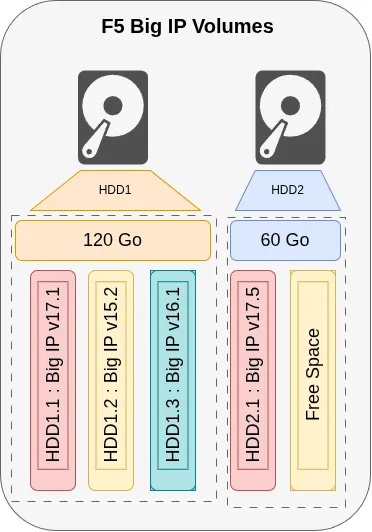
In F5 BIG-IP, you can view the overall disk layout by navigating to System → Disk Management. This screen lists all available disks along with ...