Exam Topics
- F5CAB1
- F5CAB1.03
- Identify Service Check Date (upgrade)
- F5CAB1.03
Introduction
Upgrading an F5 Big-IP system requires careful attention not only to the software version but also to licensing. In the HA pair upgrade article, we emphasized that upgrades (as opposed to updates) should be approached with caution. In this article, we will explore two critical dates, Service Check Date and License Check Date, and how they determine whether your configuration can be loaded after an upgrade.
What is the Service Check Date?
The Service Check Date represents the last time the system license was successfully validated by F5. This validation occurs either during the initial licensing process or when the license is reactivated.
Under normal conditions, when the device has a valid service contract, each successful license activation or reactivation updates the Service Check Date to the activation date. During the service contract period, you are entitled to F5 technical support, software updates, and hardware replacement services, as defined by your support agreement.
However, if the service contract has expired, the behavior changes. Even if the license is reactivated, the Service Check Date will not be updated to the license reactivation date. Instead, it is automatically set to, or remains at, the service contract expiration date.
In summary, the Service Check Date is always the earlier of the following two dates:
-
The date the license was last activated or revalidated
-
The expiration date of the service contract for the device
This design prevents extending support or update eligibility through license reactivation alone and explains why the Service Check Date stops progressing once the service contract has expired.
Example:
-
Service contract expiration: 01/2028
-
License activation: 02/2026
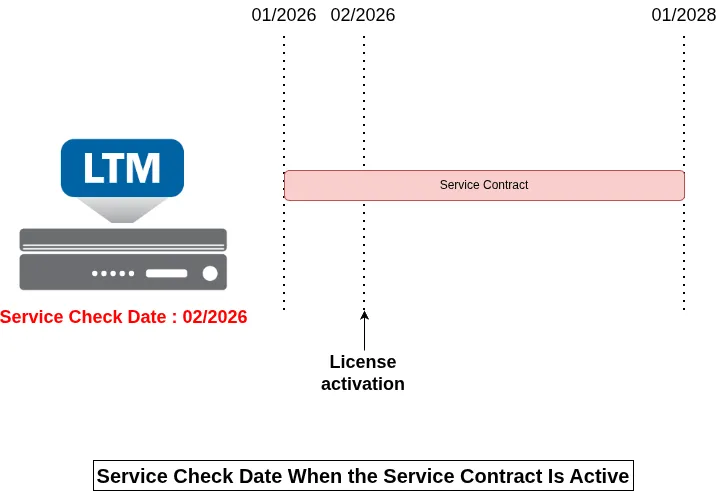
The Service Check Date will be 02/2026, as it is earlier than the service contract end.
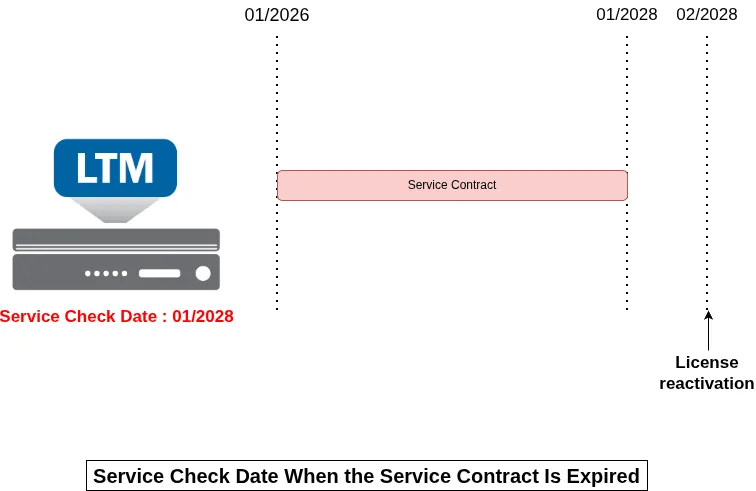
If you attempt to reactivate the license after the service contract expires (e.g., in 01/2029), the Service Check Date will remain at 01/2028.
What is the License Check Date?
Every BIG-IP major software version, has a License Check Date. This date represents the minimum Service Check Date that a system must have in order to be eligible to upgrade to that software version.
When upgrading BIG-IP, the system compares its current Service Check Date to the License Check Date of the target software version:
-
If the system’s Service Check Date is on or after the License Check Date, the new version is permitted to use.
-
If the system’s Service Check Date is earlier than the License Check Date, the new version is not permitted to use.
This mechanism ensures that only systems with a sufficiently recent and valid service contract can uses newer BIG-IP versions.
You can check the license check date of a specific version by reading the file /etc/version_date:
For example, a 17.1.x system display 20230208, meaning the system expects a service check date of at least February 8, 2023.
Upgrade Verification Logic
When upgrading a BIG-IP to a new major version, the system checks whether the current Service Check Date meets the License Check Date requirement hardcoded in the target software version.
If the Service Check Date is older than the required License Check Date:
-
The system will still boot, but the configuration will not load.
-
The BIG-IP enters operative mode, meaning it is accessible via the Web UI or tmsh, but it will not process any traffic.
-
This behavior allows you to reactivate the license to update the Service Check Date, provided you have a valid service contract.
In other words, the system does not prevent the upgrade, but if the Service Check Date is not compliant, the device will be inoperative until the license is corrected. This safeguards against running a major version on a device with an expired or invalid support contract.
The License Check Date is only relevant when performing a major or minor version upgrade, that is, when changing the first two numbers of the BIG-IP version (for example, 16.0 → 17.0, or 17.1 → 17.2).
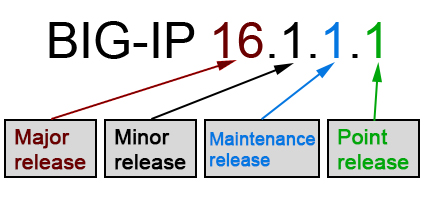
During a maintenance or point release update (changes in the remaining numbers, e.g., 17.0.1 → 17.0.2), the License Check Date does not change. Therefore, you will never encounter issues with the Service Check Date when applying updates.
This distinction ensures that upgrades enforce service compliance, while routine updates remain safe and uninterrupted.
How to Verify and Re-activate the License
Before performing a major version upgrade, it is best practice to compare the system’s Service Check Date with the target version’s License Check Date.
Doing so helps ensure that the device will boot normally with a loaded configuration. If the Service Check Date is too old, failing to check beforehand may result in the system rebooting into operative mode, where the configuration does not load and traffic is not processed, requiring license reactivation to restore full functionality.
This simple verification can prevent an upgrade from leaving the device temporarily inoperative.
Retrieving the Service Check Date
The Service Check Date is stored in the file /config/bigip.license
You can retrieve it from the CLI using:
Alternatively, you can view it using tmsh:
If the Service Check Date is earlier than the License Check Date of the version you plan to upgrade to, you must reactivate the license.
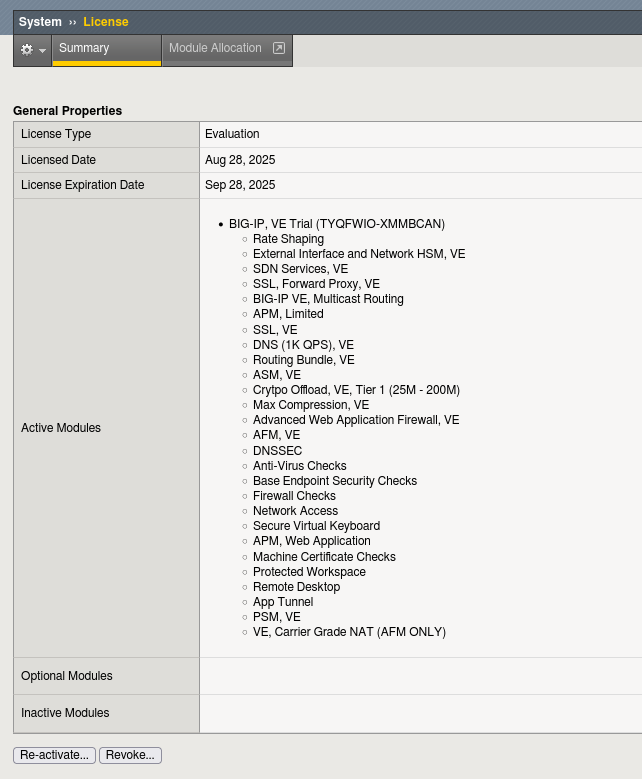
Re-activating the license:
-
Navigate to System → License in the Configuration Utility.
-
Click Re-activate.
-
Choose automatic or manual reactivation as described in the license management course.
This updates the Service Check Date to the current day, assuming a valid service contract is active. After reactivating the license, confirm that the Service Check Date has been correctly updated by running the command again.
Reference: License Check Dates for F5 Versions
For reference, below are the License Check Dates for several major BIG-IP versions. For the most up-to-date information, always refer directly to F5.
| Product | Version | License Check Date (yyyy/mm/dd) |
|---|---|---|
| BIG-IP | 21.0.x | 2025/10/29 |
| BIG-IP | 17.5.x | 2025/02/12 |
| BIG-IP | 17.1.x | 2023/02/08 |
| BIG-IP | 17.0.x | 2022/03/31 |
| BIG-IP | 16.1.x | 2021/06/11 |
| BIG-IP | 16.0.x | 2020/06/16 |
| BIG-IP | 15.1.x | 2019/11/05 |
| BIG-IP | 15.0.x | 2019/05/03 |
| BIG-IP | 14.1.x | 2018/10/25 |
| BIG-IP | 14.0.x | 2018/07/11 |
Conclusion
To upgrade a BIG-IP major version:
-
✅ The Service Check Date must be on or after the target version’s License Check Date.
-
✅ Best practice: Reactivate the license before upgrading to ensure the Service Check Date is current.
-
✅ The Service Check Date is stored in
/config/bigip.licenseand can also be checked with:
Keeping the Service Check Date up-to-date prevents the device from entering operative mode without processing traffic after an upgrade.