Exam Topics
- F5CAB2
- F5CAB2.03
- Identify traffic diverted due to persistence
- F5CAB2.03
Introduction
A typical Virtual Server deployment uses a pool of servers combined with a load-balancing method. This allows traffic to be efficiently distributed across all available servers using various algorithms. By default, each new connection is independently load balanced, meaning a client may be sent to a different backend server for each new session.
However, in some scenarios, it is important for all requests from the same client to be consistently directed to the same backend server. This is commonly required for applications that maintain session state locally on the server, such as web applications that store user session information in memory.
This is where a persistence profile comes into play.
Why do you need persistence ?
Using traditional load balancing, each subsequent session of the user can be redirected to multiple and different backend server.
On some case, you want the request of the client to be redirected to a unique backend server for all session.
- E-commerce applications : During an online purchase, shopping cart information might be stored on a specific server. Persistence ensures the user continues interacting with the same server throughout the checkout process so the shopping cart is not lost.
- Multi-step workflos: Applications with multi-step forms (registration processes, booking systems, ticket purchases) often require persistence to avoid losing progress between steps.
- WebSocket long lived : Applications using WebSockets or long polling often benefit from persistence to maintain session context during reconnect attempts.
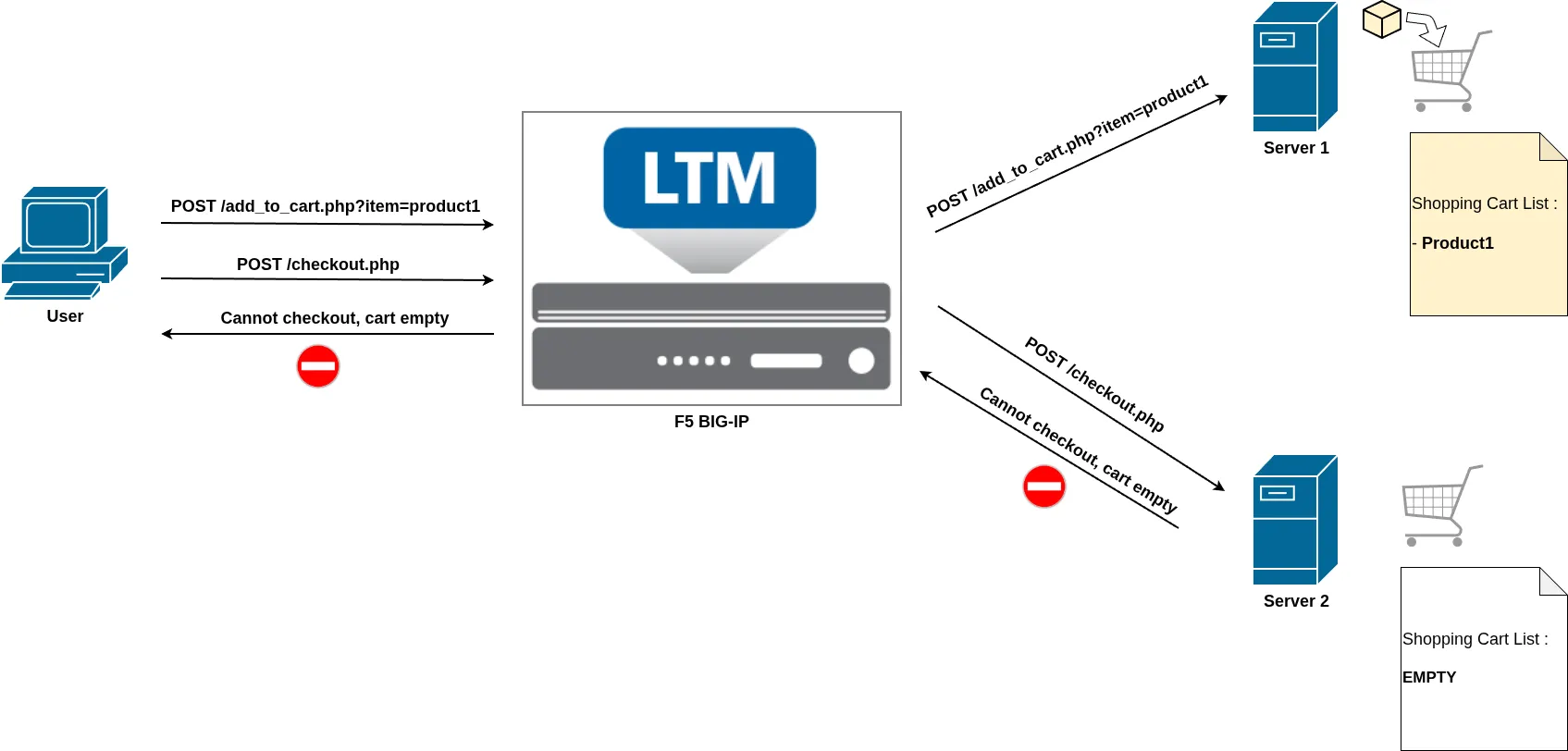
In this example, a client first sends a request to the add_to_cart page to add an item to their shopping cart. Server 1 handles this request and stores the shopping cart information locally in its memory.
However, when the client later makes a new request to access the checkout page, a new load-balancing decision is performed. This time, the client is redirected to Server 2.
Because the shopping cart data was stored locally on Server 1 and not shared between servers, Server 2 has no knowledge of the cart contents. As a result, the checkout process fails or the user sees an empty cart.
This is a typical example where a persistence profile is required. By enabling persistence, the F5 BIG-IP ensures that all requests from the same client are consistently sent to Server 1, allowing the shopping cart session to remain intact and the checkout process to complete successfully.
Persistence Profiles
On F5 BIG-IP, persistence is enabled by applying a persistence profile to a Virtual Server. There are several types of persistence profiles, each designed for different use cases depending on how client sessions need to be maintained.
Persistence profiles can be created and managed from Local Traffic → Profiles → Persistence in the Configuration Utility.
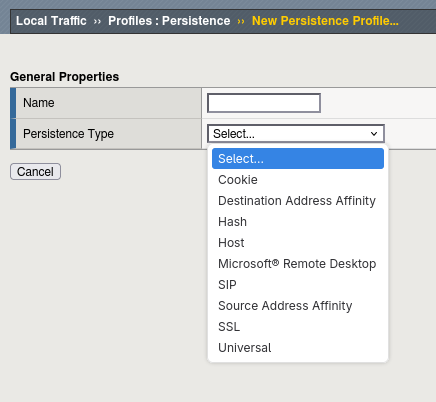
From this menu, you can create a new persistence profile by selecting a parent profile, which defines the persistence method and its base configuration. Each parent profile corresponds to a different persistence mechanism.
Once the persistence profile is created, it must be assigned to a Virtual Server from the Resources tab.
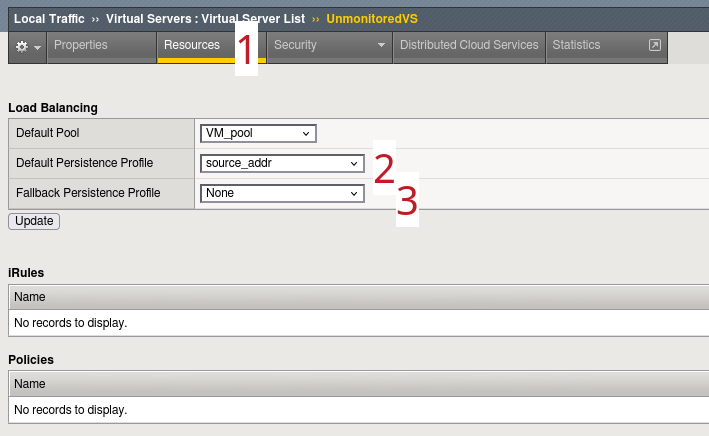
Here you can configure:
- The Default Persistence Profile, which is the primary method used to maintain session stickiness
- An optional Fallback Persistence Profile, which is used if no persistence record can be found with the primary method
The fallback method is particularly useful when combining persistence strategies. For example, you might use Cookie persistence as the primary method and Source Address Affinity as a backup if the cookie is not present (user not accepting cookies).
Verification using tmsh (CLI)
Persistence profile applied to a virtual server
As with the Configuration Utility (GUI), you can quickly verify whether a persistence profile is applied to a Virtual Server using tmsh (CLI).
You can check this by displaying the Virtual Server configuration with the command:
list ltm virtual vs-name
Example using the Virtual Server named UnmonitoredVS :
ltm virtual UnmonitoredVS {
creation-time 2026-03-14:02:30:40
destination 192.168.120.11:https
fallback-persistence source_persistence
ip-protocol tcp
last-modified-time 2026-04-01:12:50:19
mask 255.255.255.255
persist {
  cookie_persistence {
    default yes
  }
}
pool VM_pool
profiles {
   http { }
   tcp { }
}
serverssl-use-sni disabled
source 0.0.0.0/0
translate-address enabled
translate-port enabled
vs-index 3
}
In the command output:
- The default persistence profile appears under the persist attribute.
- The fallback persistence profile appears under the fallback-persistence attribute.
This provides a quick way to verify persistence is applied directly from the command line without needing to access the GUI.
Review Persistence session table
For persistence methods that rely on a persistence session table stored in the F5 BIG-IP memory, you can use a tmsh command to display the current persistence records:
show /ltm persistence persist-records
Example output:
root@(mybigip)(cfg-sync Standalone)(Active)(/Common)(tmos)# show /ltm persistence persist-records
Sys::Persistent Connections
source-address 192.168.110.10 192.168.120.11:80 192.168.130.10:80 (tmm: 0)
This output displays:
- The type of persistence (here: source-address)
- The persistence key (here: client source IP 192.168.110.10)
- The virtual server address (192.168.120.11:80)
- The selected pool member (192.168.130.10:80)
- The TMM instance handling the entry
The persistence key depends on the persistence method. For example, with SSL persistence, the key is the SSL Session ID:
root@(mybigip)(cfg-sync Standalone)(Active)(/Common)(tmos)# show /ltm persistence persist-records
Sys::Persistent Connections
ssl-session-id 32e83402862ca8e61ab05c0bee75506f6690109c35546c78edc56172be05a07f 192.168.120.11:443 192.168.130.10:443 (tmm: 0)
Total records returned: 1
Some persistence methods, such as most Cookie persistence modes (for example Cookie Insert), do not require entries in the persistence table because the persistence information is stored directly in the client cookie. In these cases, the persistence table may show no entries:
root@(mybigip)(cfg-sync Standalone)(Active)(/Common)(tmos)# show /ltm persistence persist-records
Sys::Persistent Connections
Total records returned: 0
You can also add the all-properties option to display additional details such as the remaining lifetime (Age) of the persistence entry:
show /ltm persistence persist-records all-properties
Example:
Sys::Persistent Connections
ssl-session-id - 192.168.120.11:443 - 192.168.110.10:80
TMM 0
Mode ssl-session-id
Value 32e83402862ca8e61ab05c0bee75506f6690109c35546c78edc56172be05a07f
Age (sec.) 86
Virtual Name /Common/UnmonitoredVS
Virtual Addr 192.168.120.11:443
Node Addr 192.168.130.10:443
Pool Name /Common/VM_pool
Client Addr 192.168.110.10
Owner entry not mirrored
Remove persistence entry
We have seen how to display the persistence table, which allows you to verify to which backend server a specific client is persisted. In some situations, you may want to manually remove a persistence entry, for example to unstick a user during troubleshooting or testing.
You can remove a persistence entry using the following command:
delete ltm persistence persist-records
The exact parameters depend on the persistence method used.
For Source Address Affinity, you can simply remove the entry using the client-addr option followed by the client IP address:
delete ltm persistence persist-records client-addr 192.168.110.10
For other persistence types, you must specify both the persistence key and the mode. For example, with SSL persistence, you must provide the SSL Session ID and specify the ssl-session-id mode:
delete ltm persistence persist-records key 31dd8b6ef4d1ef82f90492d63d78776aa6c50fb1e3c96bdd23d26ecfcdc8873a mode ssl-session-id
This operation forces the BIG-IP to treat the next client connection as a new session, resulting in a new load-balancing decision and the creation of a new persistence entry. This can be particularly useful when testing load balancing behavior or resolving user session issues.
Conclusion
Persistence is an important feature when load balancing applications that maintain local session data, such as shopping carts, login sessions, or multi-step transactions. Without persistence, each new connection could be sent to a different backend server, potentially causing session loss or application errors.
In this article we reviewed the key concepts of persistence on F5 BIG-IP:
- Why persistence is needed, especially for applications that store session data locally
- How to configure a default persistence profile and optionally a fallback persistence profile on a Virtual Server (used when no record is found with the primary method)
- How to verify persistence behavior from the CLI by reviewing the persistence table with:
show ltm persistence persist-records
Understanding how persistence works and how to verify its behavior allows you to ensure consistent user experience while maintaining efficient load balancing.