Exam Topics
- F5CAB1
- F5CAB1.01
- Configure DDoS Vectors
- F5CAB1.01
Introduction
In the F5 DDoS Vector course, we explored how DDoS vectors work, how attacks are detected and mitigated, and how to configure manual detection and mitigation thresholds using fixed EPS values.
While manual thresholds provide precise control, they can be difficult to maintain in real world environments.
In this article, we focus on Threshold Modes in F5 AFM. You will learn how automatic detection and mitigation dynamically adjust thresholds. We will also cover when to use manual, automatic, or mixed modes, and how to choose the right strategy depending on the protocol and deployment scenario.
This approach helps reduce false positives, adapts to traffic variations, and simplifies long term DDoS protection management.
Threshold Modes
So far, we have configured the detection thresholds and the mitigation threshold using manually defined values. While this approach works, it quickly becomes challenging in real environments.
F5 AFM provides hundreds of DDoS vectors. Manually tuning thresholds for each vector can be time consuming and error prone. It is often difficult to determine the correct EPS value for an attack such as a TCP SYN flood without deep knowledge of normal traffic patterns.
In addition, static thresholds do not adapt over time. Traffic naturally varies depending on multiple factors:
- Day versus night traffic patterns
- Business hours versus off hours
- Seasonal peaks such as Black Friday or major events
A threshold that is valid today may no longer be appropriate tomorrow. Maintaining accurate static values requires continuous tuning, which is rarely practical.
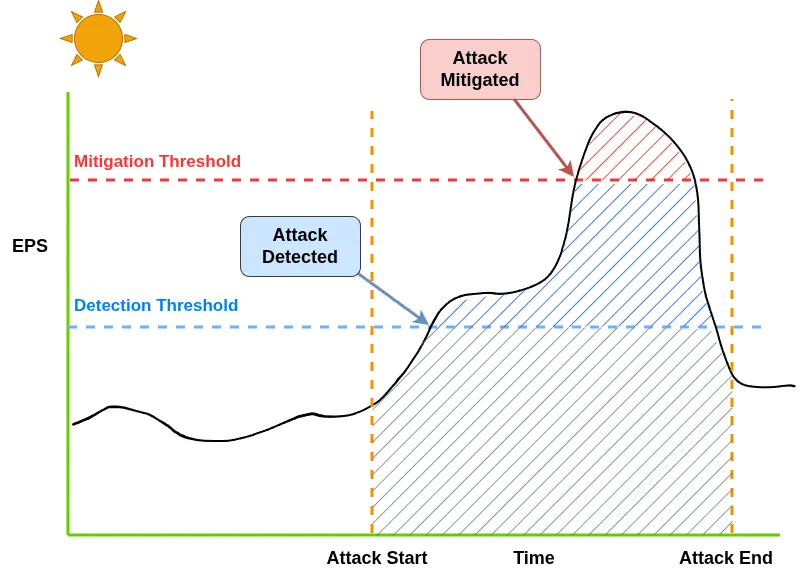
In this example, the EPS thresholds are tuned for daytime activity. If an attack occurs during business hours, the thresholds are appropriate and the attack is correctly detected and mitigated.
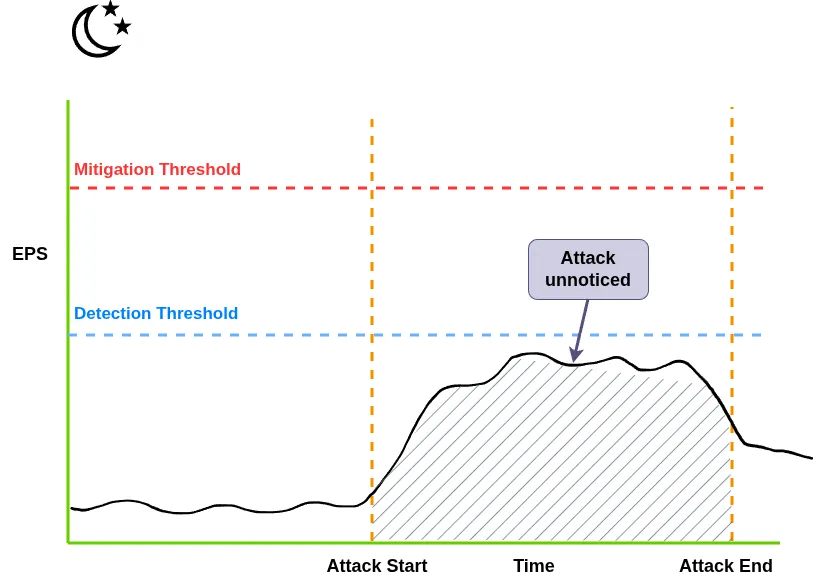
However, during nighttime activity, the baseline EPS is significantly lower than during business hours. If the same thresholds are kept, an attack may not generate enough traffic to reach the daytime EPS threshold and could therefore go undetected.
This is where automatic threshold modes become useful.
Auto Detection
When Auto Detection is enabled, F5 AFM continuously learns from historical traffic patterns to establish a dynamic baseline of the detection threshold. ...